
PhoneWallet for Windows PC1.0 - Download
You'll be able to download in few seconds.
Publisher Description
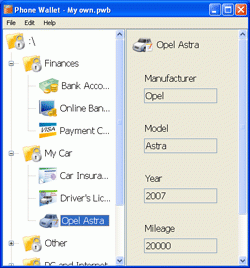
Tired of remembering all confidential information? With only one Phone Wallet application you will keep all secure info in one place and have access to it any time.
Phone Wallet helps you safely store all the data not only on your mobile phone but also on your PC. Secured data become unavailable for others, you set your own entrance password, which is known only to you. The mobile and PC versions use one entrance password.
Nobody could read your passwords, logins or any other info even after making the disk dump. To be sure that nobody can access your data you can change your password often.
As the mobile version of the software, the Phone Wallet for Windows PC is fully customizable according to your needs. You can easily add your own folders, customize or delete existing ones. In every folder you can make as many items as you wish with your own fields.
Key Features:
- Strong data encryption for your data security with Advanced Encryption Standard (AES)
- Ability to send your data to Phone Wallet mobile version
- The software is absolutely FREEWARE
- Layout settings for icons and view styles
- Total flexibility for adding, deleting and editing of folders, records and fields
About PhoneWallet for Windows PC
This Access Control program is available in English. It was last updated on 29 September, 2026. PhoneWallet for Windows PC is compatible with the following operating systems: Windows.
The company that develops PhoneWallet for Windows PC is SymbianGuru. The latest version released by its developer is 1.0.
The download we have available for PhoneWallet for Windows PC has a file size of 4.2 MB. Just click the green Download button above to start the downloading process. The program is listed on our website since 2009-04-08 and was downloaded 0 times. We have already checked if the download link is safe, however for your own protection we recommend that you scan the downloaded software with your antivirus. Your antivirus may detect the PhoneWallet for Windows PC as malware if the download link is broken.
How to install PhoneWallet for Windows PC on your Windows device:
- Click on the Download button on our website. This will start the download from the website of the developer.
- Once the PhoneWallet for Windows PC is downloaded click on it to start the setup process (assuming you are on a desktop computer).
- When the installation is finished you should be able to see and run the program.
Program Details
System requirements
Download information
Pricing
Version History
version 1.0
posted on 2009-04-08
Disclaimer
External Download
We do not host PhoneWallet for Windows PC on our servers. We did not scan it for viruses, adware, spyware or other type of malware. This app is hosted by the software publisher and passed their terms and conditions to be listed there. We recommend caution when installing it.
The external download link for PhoneWallet for Windows PC is provided to you by apps112.com without any warranties, representations or guarantees of any kind, so access it at your own risk.
If you have questions regarding this particular app contact the publisher directly. For questions about the functionalities of apps112.com contact us.
